AI Library
The AI Library is the primary workspace for deploying and managing AI capabilities within your organization. It is accessible from the library (grid) icon in the left sidebar and contains three categories of deployable AI components: Assistants, Routines, and Integrations (MCP servers).
5.1 Assistants
Assistants are interactive AI chat interfaces configured for a specific organizational function. Each assistant is connected to one or more AI language models and can be granted access to defined knowledge sources as internal documents, technical standards, regulatory filings, or operational databases enabling it to answer domain-specific questions with sourced, contextually accurate responses.
Assistants are the fastest AI capability to deploy on Sorgi, typically configurable within minutes. They are the recommended starting point for any AI programme and provide immediate productivity value for knowledge workers across all functions.
5.1.1 Creating an Assistant
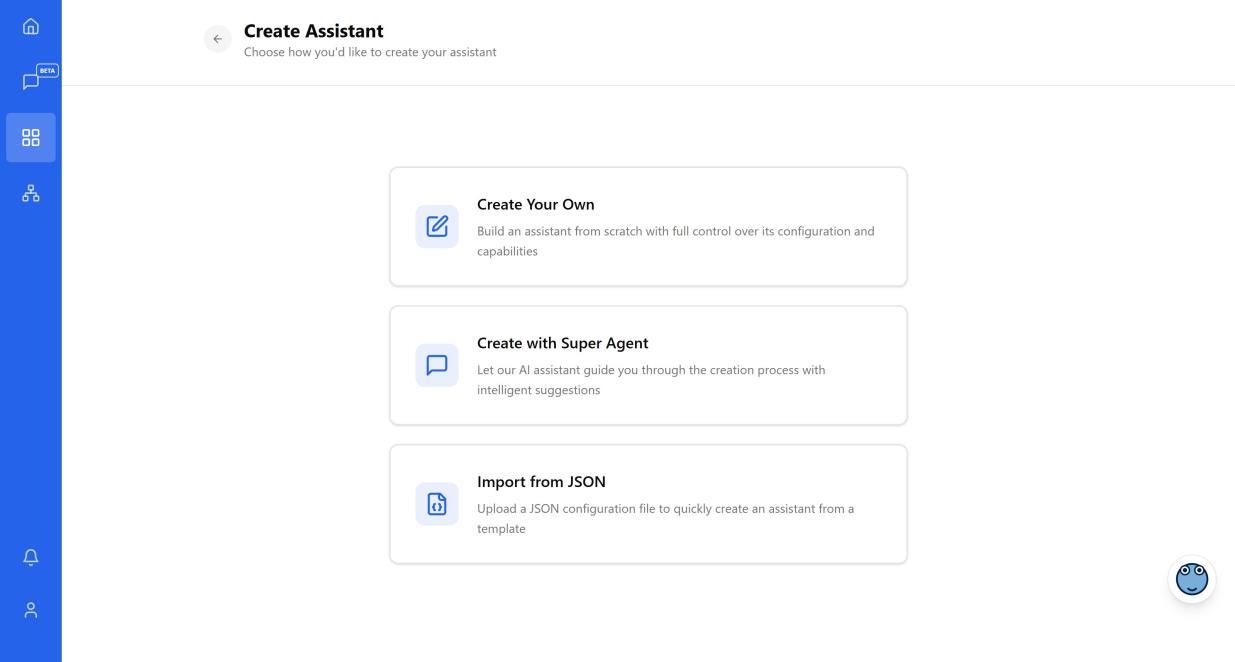
To create a new assistant, navigate to the Library section and click + New Assistant. You will be presented with three creation methods:
- Create Your Own: Build an assistant from scratch with full control over its name, purpose, system prompt, connected knowledge sources, model selection, and configuration settings.
- Create with Super Agent: A guided creation workflow where Sorgi's AI assistant interviews you about your use case and intelligently generates an assistant configuration based on your responses. Recommended for users who are new to AI configurations.
- Import from JSON: Upload a pre-existing assistant configuration file in JSON format to rapidly deploy from a template or replicate an existing assistant.
5.1.2 Choosing a Setup Path
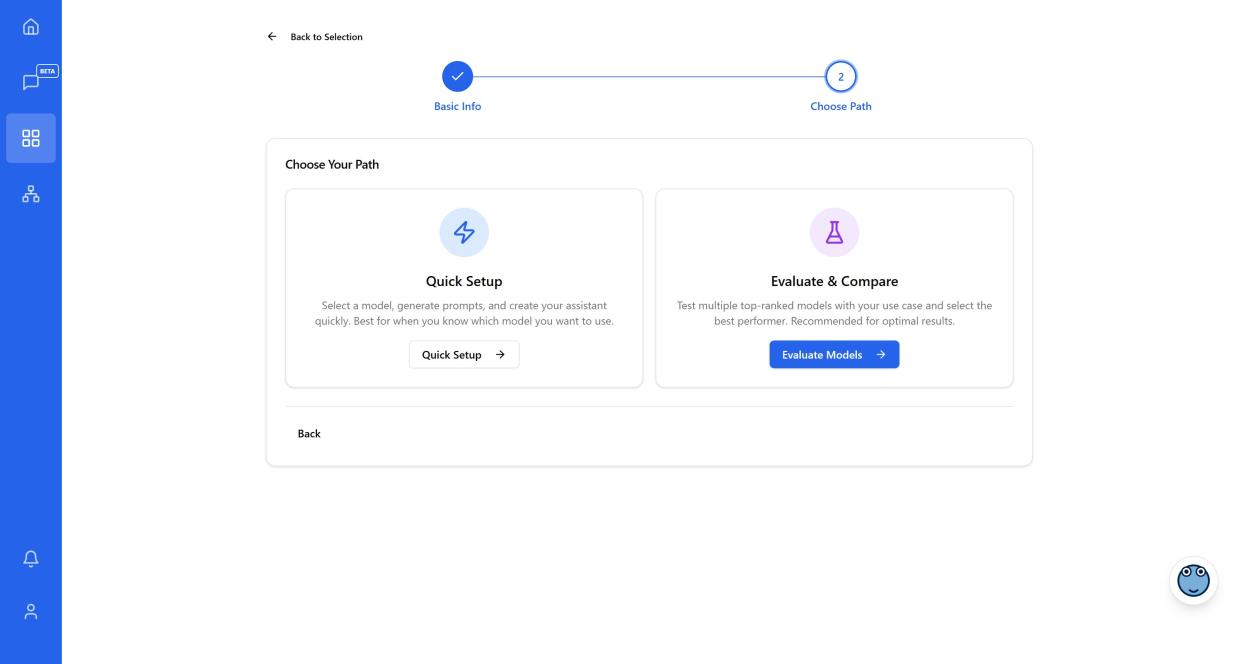
After providing basic information about your assistant (name, description, and use case), you will choose your setup path:
- Quick Setup: Select a model directly and configure your assistant immediately. Best suited for users who already know which AI model they wish to use.
- Evaluate & Compare: Run your assistant's use case against multiple top-ranked models simultaneously and compare outputs side by side before committing to a model. This path is recommended for production deployments where model selection has a meaningful impact on output quality.
Once created, assistants can be accessed directly by users via the chat interface. Each assistant can also be exposed as a REST API endpoint for programmatic consumption by external systems.
5.1.3 Agentic Capabilities
By connecting an assistant to one or more integrations (MCP servers), the assistant gains agentic capabilities — the ability to not only respond to queries but to take actions on connected systems. For example:
- An assistant connected to a calendar integration can create and manage meetings.
- An assistant connected to a project management system can create and update tasks.
Agentic actions taken by an assistant are clearly surfaced in the conversation interface so users retain full visibility.
5.2 Routines
Routines are multi-step automated workflows executed by AI on a defined trigger: a scheduled time, a data event, an upstream system output, or a manual initiation. A routine chains one or more assistants together with integration actions, executing each step in sequence and passing context from one step to the next.
Common routine use cases include:
- Automated compliance checks
- Document ingestion and summarization
- Notification routing
- Data validation workflows
- Report generation
Once configured and validated, routines run continuously and consistently, eliminating the manual coordination overhead that consumes time in every operational function.
5.2.1 Routine Pipeline Structure
A routine is visualized as a vertical pipeline in the platform. Each node in the pipeline represents either an AI assistant or a connected tool integration. Nodes are connected in sequence, with the output of each step serving as the input context for the next.
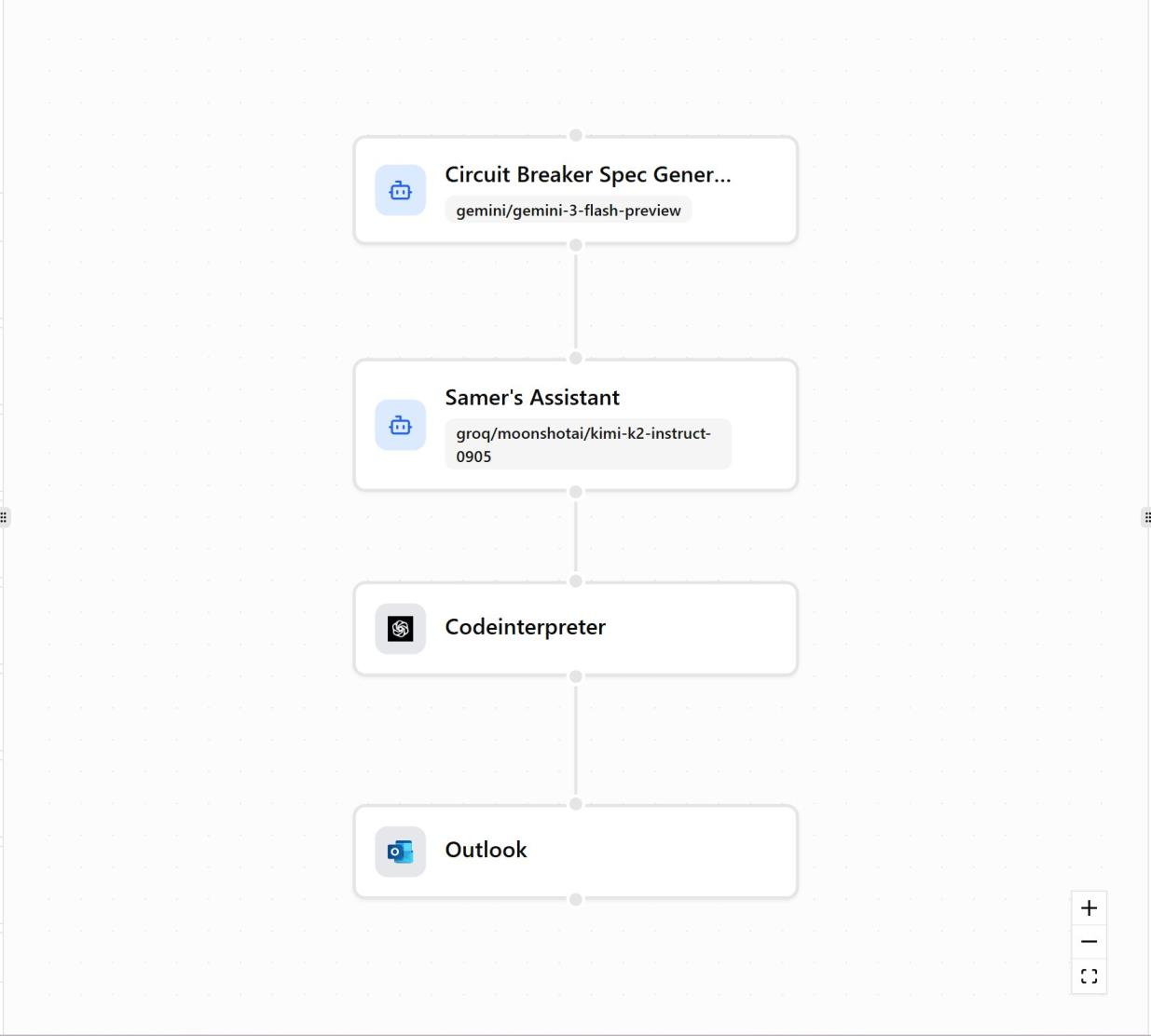
The example above illustrates a routine that:
- Begins with an AI assistant (Circuit Breaker Spec Generator, powered by Gemini).
- Passes its output to a second assistant (Samer's Assistant, powered by a Groq-hosted model).
- Routes to a Codeinterpreter tool for computational processing.
- Delivers the final output via an Outlook integration.
This pattern of chaining AI reasoning with tool execution is the fundamental building block of all Sorgi routines.
5.3 Integrations (MCP Servers)
The Integrations section of the Library contains all active MCP (Model Context Protocol) server connections registered with the platform. MCP servers are the connectors that give AI assistants and routines the ability to interact with external systems — reading data, writing records, triggering actions, or receiving events.
Common integrations include:
- Microsoft Office 365 (Outlook, Teams, SharePoint)
- Google Workspace
- Project Management Tools (Jira, Asana)
- Data platforms, custom REST APIs, and industry-specific operational systems.
Administrators configure integrations by adding the relevant API credentials to the Secrets vault and then registering the MCP server in the Integrations panel.